Loop and reps
Loop measures, set the number of reps, and isolate instruments to focus on one part of the kit.

Drumr features
The full tour: playback, practice tools, feedback, and the small things that keep you coming back to the kit.
Interactive player
Hear precise drum playback and follow every note with SnapCursor.
Loop measures, set the number of reps, and isolate instruments to focus on one part of the kit.
Build speed and control from 30 to 300 bpm with Linear, Increasing, or Up-Down tempo modes.
Practice without a connection. The first launch, lesson videos, and playalongs need internet.
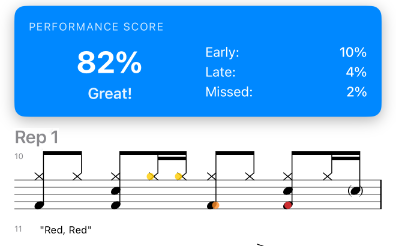
Performance Analysis
Performance Analysis marks early, late, and missed notes right on the notation, rep by rep, so you can see where to focus next.
Visual guidance
Highlights each note as it plays, so your eyes always know where the beat is.
Lights up the drum kit in time with the music.
Animated sticking for rudiments.
Animates each marching bass drum in real time.
Shows each measure's subdivisions as timed slices.
Play your part with the snare, tenors, and bassline on matching marching scores, or with drumless tracks on supported scores.
Scores
Thousands of grooves, fills, and exercises, from your first beat to advanced kit and drumline work, from Geoff Fry, Hudson Music, Mel Bay Publications, and more.
Structured paths, including Geoff Fry's Beginner Course, with lesson videos on supported scores.
Randomized groove and grid variations to keep practice fresh.
Put scores in your own order, share playlists, and move from one score to the next.
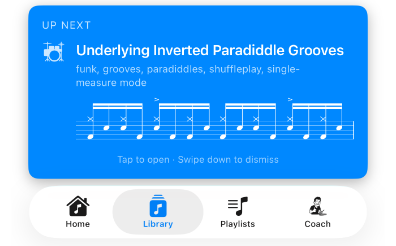
Recommendations and Coach
Get a useful next step from your recent practice. Coach adds score recommendations, tempo guidance, app help, and custom playlists. Tap a recommended score and start playing.
Coach is private, fast, and works in your device language. Requires Apple Intelligence.
Progress
Keep notes on what clicked and what needs work. Session history and tempo charts show how far you've come.
Milestones for first wins, tempo goals, perfect sessions, and practice achievements.
Record practice videos to review and share.
Everywhere you practice
Screenshots
Free download with 80+ free scores. Premium free for 7 days.